New Bidding page
Related information
 Related topics
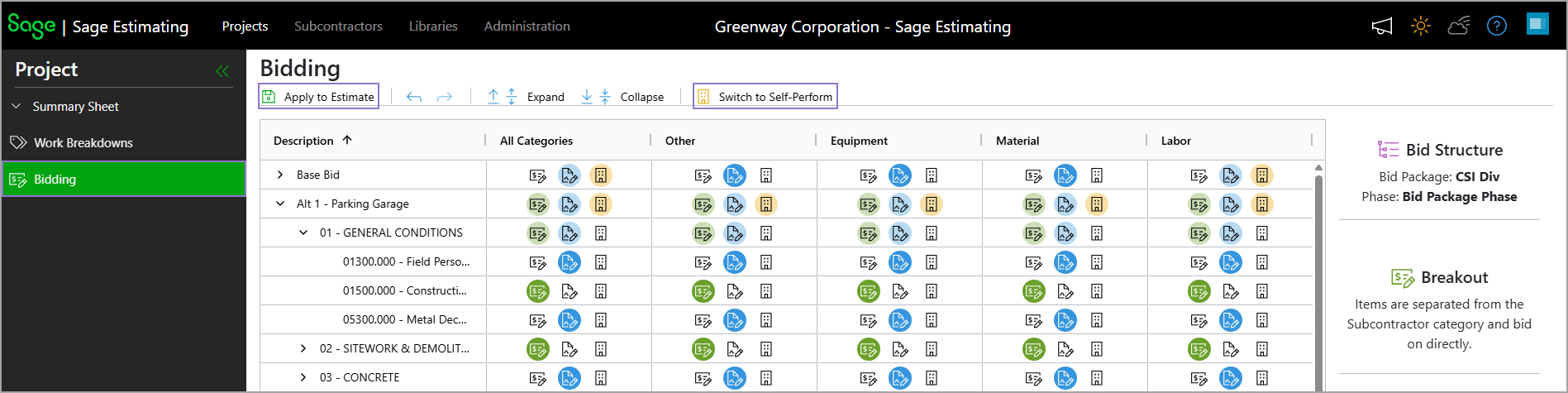
A new Bidding page is now available for projects. It provides a centralized table view of bidding participation across all categories, making it easier to analyze, update, and apply bidding structures throughout the estimate.
The new page displays visual indicators showing whether each alternate, bid package, and phase is:
-
Broken out
-
Included as part of a subcontractor bid
-
Self-performed
Icons display participation at both the category level and across all categories. Specifically:
-
When an alternate or bid package contains a mix of participation types, the applicable icons display with a light highlight.
-
When an alternate, bid package, or phase is exclusively self-performed, or when bids are fully broken out or subcontracted, a bold icon displays to make the status easier to identify.
You can perform the following actions from the Bidding page:
-
Select the breakout (
 ), bid included as part of subcontractor (
 ), or self-perform (
 ) icon at the alternate, bid package, or phase level to switch to that participation type. Changes made at a higher level are automatically applied to the levels beneath it.
 -
Select Apply to Estimate to apply any changes from the Bidding page to the estimate. Some existing bidding information might be removed based on the changes.
-
Use the undo and redo actions to reverse or reapply changes made on the Bidding page.
-
Use the expand or collapse actions to expand or collapse all levels, or one level at a time.
-
Select Switch to Self-Perform to set the entire project as self-performing. This action removes all existing bid information and converts all bidding structures to self-perform.